


Bitdefender VPN: Fast & Secure
4.72.81K Reviews
App Specs
- Version
- 2.3.3.178
- Updated On
- License
- Free
- Downloads
- 1,000,000+
- Developer
- Bitdefender
- Categories
- Tools
- Platform
- Android
Screenshots
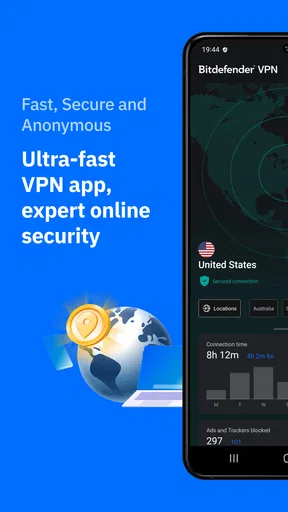
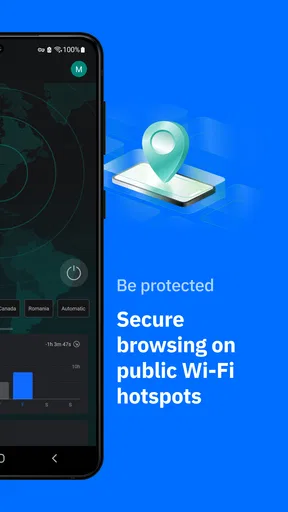
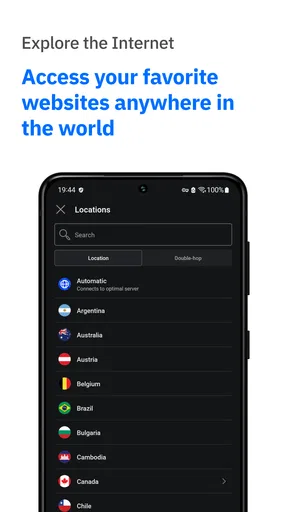
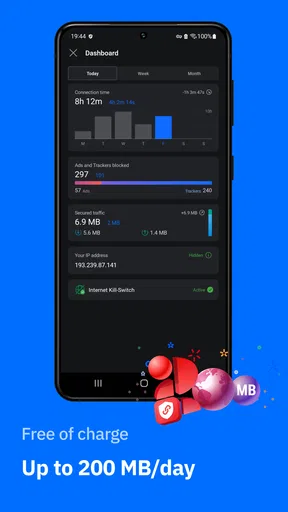

 Analysis by AppCompare
I judge a VPN less by how impressive its name sounds than by what it feels like during ordinary phone use: a quick check of email on public Wi-Fi, a video call while travelling, or a page that suddenly refuses to load. Bitdefender VPN: Fast & Secure is a tools app from Bitdefender, and its appeal is the simple idea of adding a VPN connection without turning routine browsing into a project. That straightforward approach is useful, though it also means this is not automatically the right fit for every person or every kind of VPN use.
Everyday speed, stability, and setup
On Android, Bitdefender VPN is free to install, rated for Everyone, and has a 4.7 average from around 52,000 ratings. It has been installed over a million times, which suggests it has found a substantial audience without telling me whether it will suit a particular connection or workload. The current version is 2.2.7.160, and it requires Android 5.1 or later. Those details make it accessible to many Android users, but a compatible operating system is only the starting point: a VPN still depends on the quality of the underlying Wi-Fi or mobile connection.
What “fast” means in practice
I would treat the promise of speed as a goal, not a guarantee. A VPN routes internet traffic through an additional connection, so the outcome can vary with the network, the chosen server, and what you are doing. A nearby server is usually the sensible first choice when I care more about a responsive connection than appearing to browse from somewhere else. If a page or video feels sluggish, switching server location and checking the same task again is a more useful test than assuming every VPN session should behave identically.
For everyday tasks such as messaging, reading news, and signing in to accounts, a VPN is generally less demanding than it is for high-resolution video, large downloads, or online games where delays are immediately noticeable. I would not use a single smooth session as proof that performance will be equally good at a crowded café or on weak mobile coverage. The practical question is whether the connection remains comfortable for your own routine, and that is something to judge on the networks you actually use.
Busy moments and sensible trade-offs
When a phone is doing several demanding things at once, network quality matters as much as the VPN. If I were joining a video meeting, downloading a large file, and browsing at the same time, I would avoid treating a VPN as a speed enhancer. It is a privacy tool that may add some overhead; it cannot repair a congested router or a poor signal. For a meeting, I would connect before joining, choose a nearby location, and pause nonessential downloads if the call becomes choppy.
Streaming is another case where expectations need care. A VPN can change the apparent route of a connection, but access to a particular service or catalogue can vary, and a platform may restrict VPN traffic. I would not subscribe solely on the assumption that every show in every region will always work. If a service fails to load, trying another location may be worth a quick check, but repeated server-hopping is a poor substitute for a VPN whose main purpose is simply to protect traffic on an unfamiliar network.
Reliability and the moments a connection drops
Stability is not just about whether the VPN connects once; it is also about what happens when Wi-Fi cuts out, a phone changes networks, or the VPN session needs to reconnect. The app’s stated kill switch is intended to stop internet access if the VPN connection drops, reducing the chance that traffic continues outside the protected connection. That safeguard can be valuable when privacy matters more than uninterrupted access, but it can also make a temporary VPN interruption feel like the whole internet has stopped. If that happens, check the VPN connection before troubleshooting every other app on the phone.
Worth Reading Before You Choose

Flipboard Shows What News Apps Must Do Beyond the Feed

Switching to Android Auto Means Rethinking Your Driving Routine

Google Calendar Makes a Crowded Week Easier to Manage

Ludo King Makes the Most of the Minutes Between Plans

Baby Panda World Brings Quick Play to Modern Phones, but Its Game Library Feels Busy

ESPN’s Live Game View Makes Following Close Games Easier
For reliable day-to-day use, I would make a small habit of checking the connection before entering sensitive account details on public Wi-Fi, rather than assuming a VPN is active just because I opened the app earlier. Automatic connection can reduce that bit of friction when joining public networks, but it is still worth learning where the connection status appears and how to reconnect. This is especially practical for people who move between home Wi-Fi, work networks, and mobile data throughout the day.
Android fit and limits to keep in mind
The minimum requirement is Android 5.1, so the app can run on a broad range of Android versions. That does not mean every older phone will feel equally responsive: device age, background activity, battery condition, and the strength of the network all affect the experience. If your phone is already struggling with ordinary browsing, adding a VPN may not solve the underlying problem. I would test it during normal use before relying on it for travel or work.
There is also a difference between protecting a phone’s connection and solving every privacy concern. A VPN can help shield traffic on a network, but it does not make suspicious links safe, prevent someone from reading information you willingly post, or replace careful account security. I see it as one useful layer rather than a complete security plan. Bitdefender’s reputation in security may be reassuring to some users, but I would still read the app’s current subscription and privacy terms before deciding what information and access I am comfortable with.
Who will get the most from it
This is most appealing to someone who wants a simple mobile VPN for public Wi-Fi and routine browsing, rather than a large set of controls to tune. A commuter checking work messages from a station café, for example, can connect before signing in, handle the task, then disconnect when the added protection is no longer needed. That modest workflow is often more useful than leaving an unfamiliar setting enabled without knowing when it helps or why the connection has changed.
People who need detailed control over locations, network behavior, or specialist configurations should compare the available controls carefully with those of other VPN services before choosing. Likewise, if your main reason for installing a VPN is dependable access to a specific streaming catalogue, check that requirement separately rather than relying on broad expectations. The right choice depends on whether you value a straightforward app or need a more configurable tool.
Performance and Speed
Now, let’s talk about speed. We all know that feeling of frustration when a VPN slows down your internet to a crawl. Thankfully, that wasn’t the case here. I streamed videos, downloaded files, and even played a bit of online gaming without a hitch. The speed is impressive, living up to the "Fast" in its name. It’s like having a turbo button for your internet.
I decided to put it to the test with some streaming services. Netflix, Hulu, BBC iPlayer – you name it, I tried it. And guess what? No buffering, no annoying "This content is not available in your region" messages. Just pure, uninterrupted binge-watching.
Security Features
Alright, onto the serious stuff – security. After all, isn’t that why we use a VPN in the first place? Bitdefender VPN doesn’t cut corners here. It employs top-notch encryption protocols, ensuring that your data stays under lock and key. Whether you’re shopping online or sending sensitive emails, you can do so with peace of mind.
The app also comes with a nifty kill switch feature. This means that if your VPN connection drops, your internet connection is automatically cut off to prevent any data leaks. It’s a lifesaver for those of us who are a bit forgetful about switching off the VPN manually.
Usability and Features
Navigating through the app is a breeze. Everything is where you expect it to be, and the settings are easily adjustable. Whether you’re a VPN novice or a seasoned user, you’ll find it user-friendly.
One feature that stood out to me is the automatic connection option. Imagine this: you connect to a public Wi-Fi network, and Bitdefender instantly springs into action, securing your connection without you lifting a finger. It’s like having a vigilant digital bodyguard.
Pricing and Plans
The app is free to download, but that does not mean every level of use is free. In-app purchases range from $6.99 to $69.99 per item, so I would check the purchase screen carefully and decide what access you need before committing. The price range alone does not tell you which plan suits you; compare the terms shown in the app, including renewal details, before confirming. If you only need occasional protection, consider whether your expected use justifies a paid option instead of buying out of habit.
That distinction matters because VPN needs vary. A person who mainly wants to secure a phone while using café Wi-Fi may make a different decision from someone who expects to use a VPN throughout the day. I would start by identifying the networks and activities that genuinely call for it, then choose only if the available plan matches that pattern. Being clear about the purpose helps avoid paying for access you rarely use.
Choosing it over another VPN
Compared with relying on a public Wi-Fi network without a VPN, the clear advantage is an added layer for your connection. Compared with other VPN apps, the decision is less about a universal winner and more about your priorities: ease of use can matter more than extensive manual control, while a specialist user may prefer a service with settings tailored to a particular workflow. I would also separate VPN performance from antivirus features; installing a VPN does not mean every threat on a device is addressed.
Before settling on any provider, I would test the same ordinary task in the places where I use my phone most: opening a work site on home Wi-Fi, loading a page on mobile data, and joining a call on a public network. That quick comparison reveals more than a feature list because it shows whether the added connection fits your habits. If the VPN repeatedly interrupts an essential app or makes a weak network unusable, it may be better to switch it on only when needed or compare another option.
Pricing and Plans
I know what you’re thinking – all these features must come at a steep price, right? Surprisingly, Bitdefender offers competitive pricing. There are multiple plans to choose from, depending on your needs. Whether you’re looking for a monthly commitment or want to secure a year-long plan, there’s something for everyone. Plus, they often have promotions, so keep an eye out for those sweet deals.
If you’re on the fence, they offer a free trial, which is perfect for taking the app for a test drive without any strings attached. Trust me, once you try it, you'll see why it’s worth every penny.
Final Thoughts
So, is Bitdefender VPN: Fast & Secure worth it? In my book, it’s a resounding yes. It checks all the boxes for what a great VPN should be: fast, secure, and easy to use. Whether you’re a digital nomad, a privacy advocate, or someone who just wants to watch foreign shows, this app has got you covered.
So go ahead, give it a whirl. Download it, explore its features, and enjoy a safer, faster browsing experience. Who knew peace of mind could be just a tap away?
Pros
- Fast connection speeds for streaming.
- User-friendly interface for easy navigation.
- Strong encryption ensures data safety.
- No-log policy protects user privacy.
- Affordable subscription plans available.
Cons
- Limited server locations compared to competitors.
- Occasional connection drops reported.
- Free version has data limit restrictions.
- Some features require premium subscription.
- Customer support can be slow to respond.
FAQs for Bitdefender VPN: Fast & Secure
What features does Bitdefender VPN: Fast & Secure offer?
Bitdefender VPN provides a fast and secure connection, allowing users to browse the internet privately and securely. It offers unlimited encrypted traffic, access to geo-restricted content, and protection against online threats. The app also boasts a user-friendly interface, making it easy to connect with just a single tap.
Is Bitdefender VPN compatible with both Android and iOS devices?
Yes, Bitdefender VPN is available for both Android and iOS platforms. It is designed to work seamlessly across multiple devices, ensuring that users can maintain their privacy and security whether they are using a smartphone or a tablet. The app is available for download on the Google Play Store and Apple App Store.
How does Bitdefender VPN ensure my online privacy and security?
Bitdefender VPN uses robust encryption protocols to secure your internet connection, ensuring that your data remains private and protected from hackers and other malicious entities. It hides your IP address, making your online activities anonymous and safeguarding your personal information from being tracked.
Are there any limitations or restrictions with Bitdefender VPN?
While Bitdefender VPN offers unlimited traffic, the free version may have data limits or fewer server options compared to the premium version. Users seeking enhanced features, such as access to additional servers and faster speeds, might consider subscribing to the premium plan for a more comprehensive experience.
How easy is it to set up and use Bitdefender VPN?
Setting up Bitdefender VPN is straightforward. After downloading the app, users simply need to install it, create an account, and connect to a server of their choice. The app's intuitive design ensures that even those unfamiliar with VPNs can easily navigate and secure their online activities with minimal effort.


